iOS App UX Design Evolution
The Banno Mobile app on iOS is currently undergoing an incremental user experience (UX) design overhaul to reflect Apple’s new Liquid Glass design system , which all iOS apps must adopt by 2026. To ensure a high-performing experience and better prepare financial institutions and accountholders for the modernized UX, Jack Henry is working to introduce the required changes in a series of releases – Banno Mobile versions 3.29 through 3.33.
The sections below provide an overview of the changes to date and those planned with each release.
Mobile 3.29
ShippedReleased on Thursday, November 13, 2025, Banno Mobile 3.29 on iOS included the first of many noteworthy UX updates.
This release established the modernized UI for the navigation bar across the app. Improving the navigation involved the following changes, which better align with native patterns and system theming:
- Custom toolbar options have been removed.
- Toolbar buttons now reflect the body text theme color.
- Labels now reflect the system’s primary color.
Mobile 3.30
ShippedSubmitted to the App Store on Tuesday, December 9, 2025, Banno Mobile 3.30 on iOS included adjusted colors for backgrounds and text. In both cases, the changes align to the new standard system colors for these elements, as shown in the preview below. Note that Apple must complete its reviews before the new version is available in the App Store; the review process can take a few days.
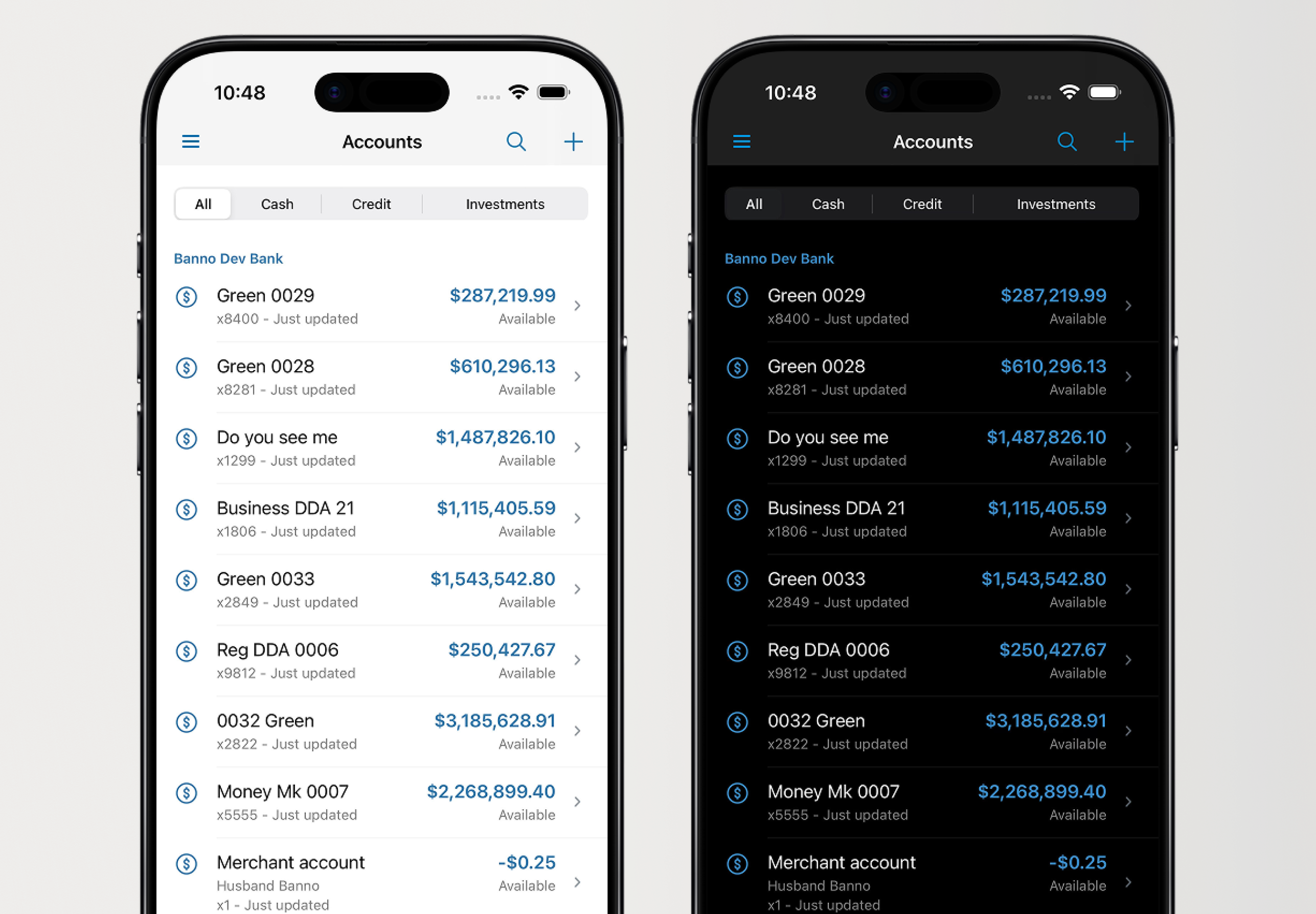
Additionally, end users will notice new styles when dismissing screens, as we have transitioned to the new system close button – an xmark enclosed in a circle. In previous versions of the app, users have tapped words like cancel, close, and done to dismiss screens.
Mobile 3.31
ShippedIn Banno Mobile 3.31, we will continue adjusting our color usage to be more purposeful. This will include less obvious changes, like the dividers used to separate accounts, and more visible changes, like section titles.
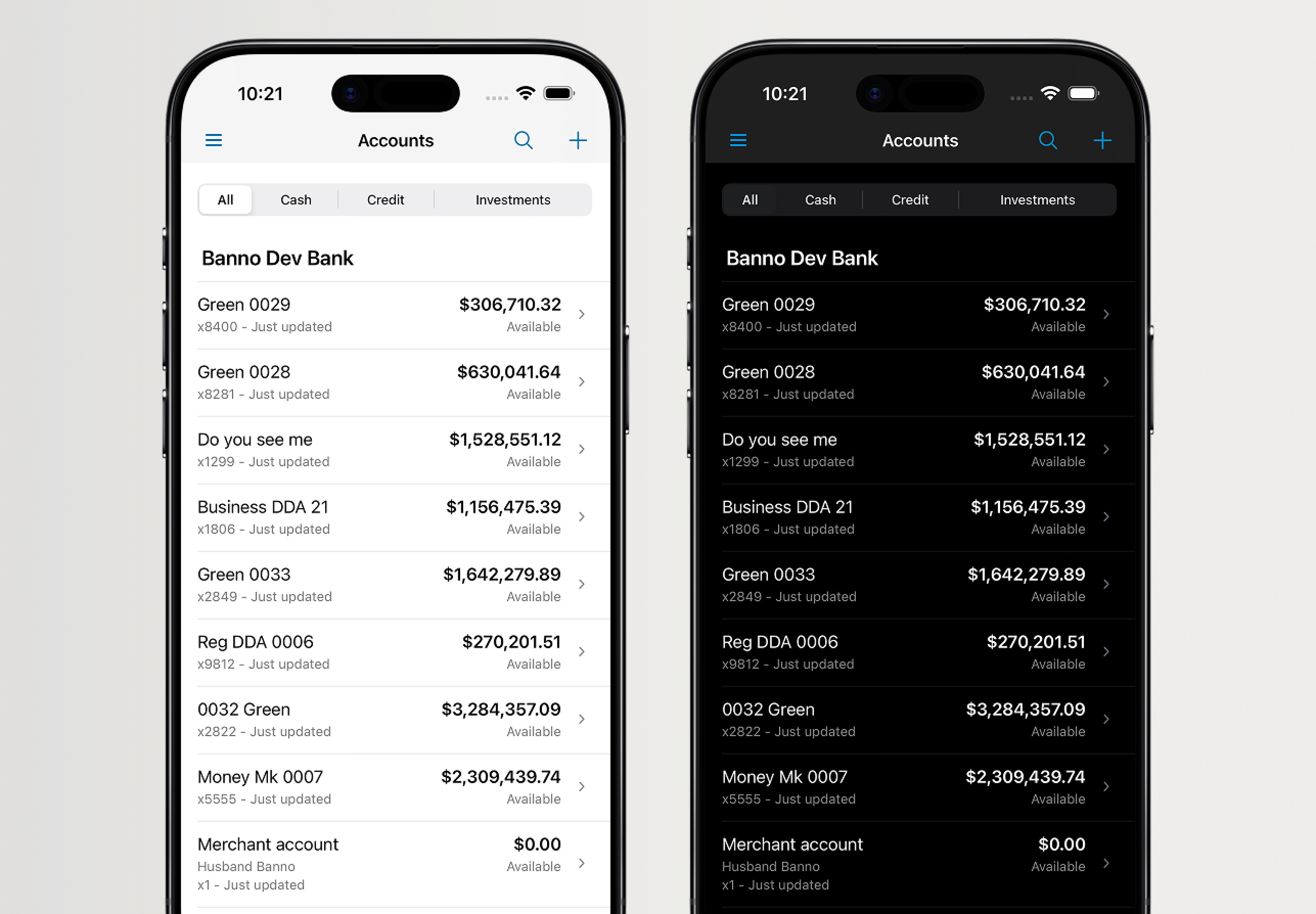
This version will also introduce the adoption of Apple’s SF Symbols, which replaces our existing Banno icon library. The latest version, SF Symbols 7 , provides additional flexibility with built-in animations and icon styles. In the future, we will leverage these advantages to enhance brand identity in the app.
Category Icon Updates
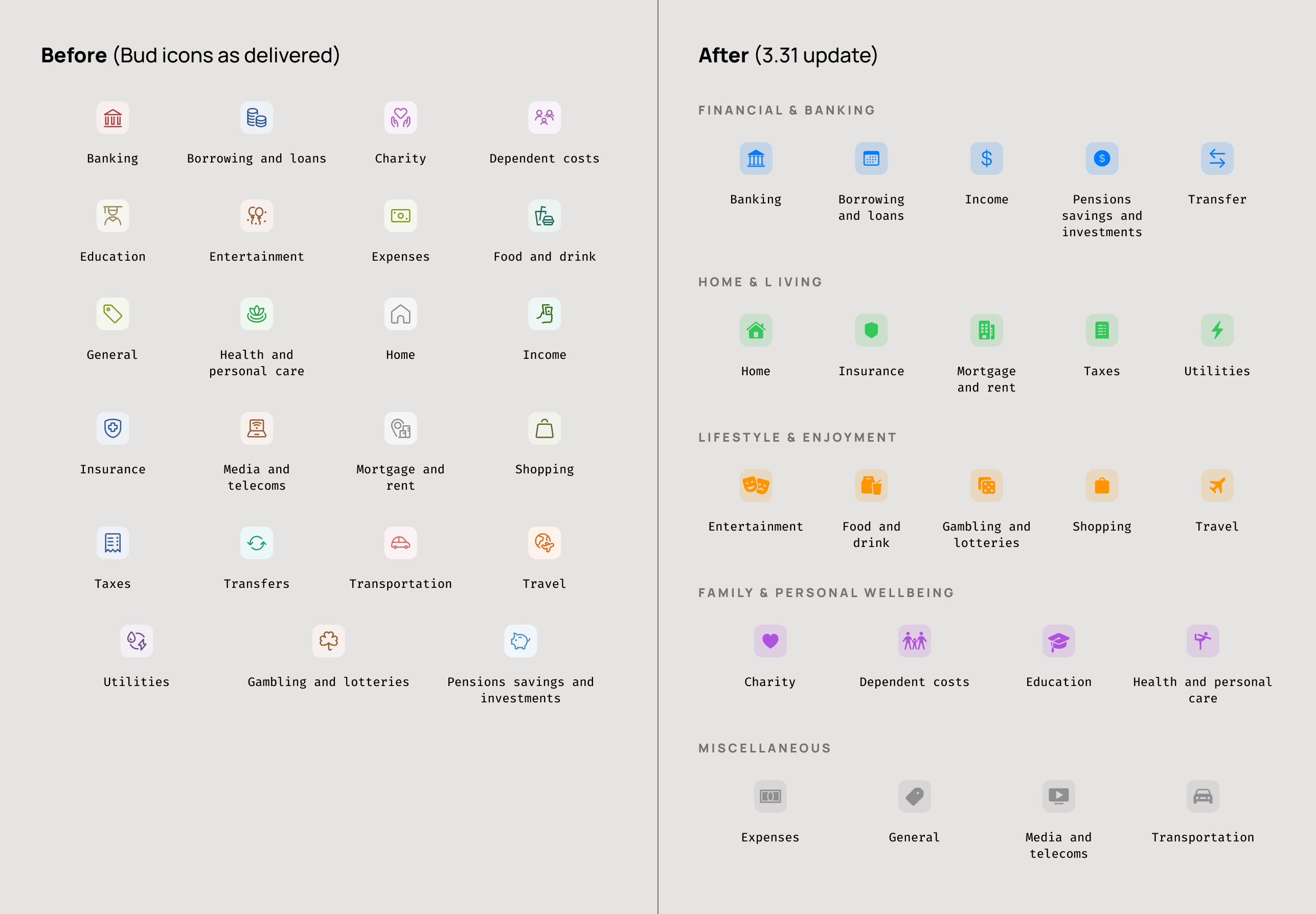
As part of release 3.31, we are also updating how spending categories sourced from Bud Financial are visually represented in the app. Bud will continue to classify transactions and categories, but the presentation of those categories is being redesigned to align with the rest of the Banno Mobile experience.
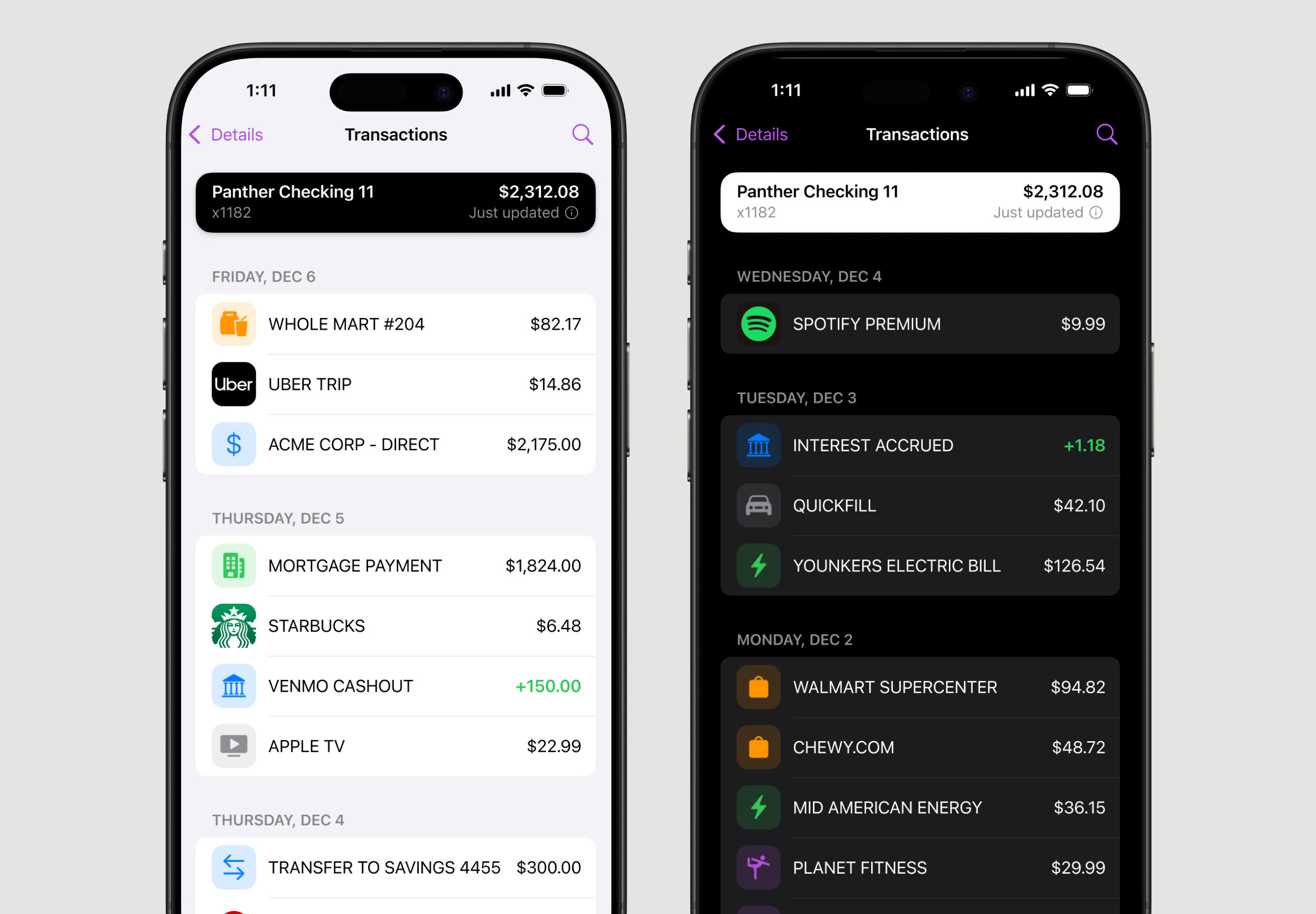
These updates include:
- New SF Symbol icons for iOS to create a more native and cohesive visual experience
- Standardized color-grouped categories to make lists easier to interpret
- Improved accessibility through platform-native scaling, dark mode support, and high-contrast compatability
- No changes to Bud’s underlying data or category logic; this enhancement affects UI presentation only
A similar update will be introduced for Android in a future release, where we will adopt Material 3 icons and color guidance to maintain cross-platform parity.
Mobile 3.32 - 3.33
ShippedOur previously communicated timeline has shifted just slightly for our iOS app. Now, Banno Mobile 3.32 will wrap much of our early preparations for Liquid Glass, and Mobile 3.33 will mark the completion of that early prep work. Over the course of the two releases, the screens used to initiate money movement will be transitioned to a consistent layout style, and we will address inconsistencies with how this type of content is presented throughout the app.
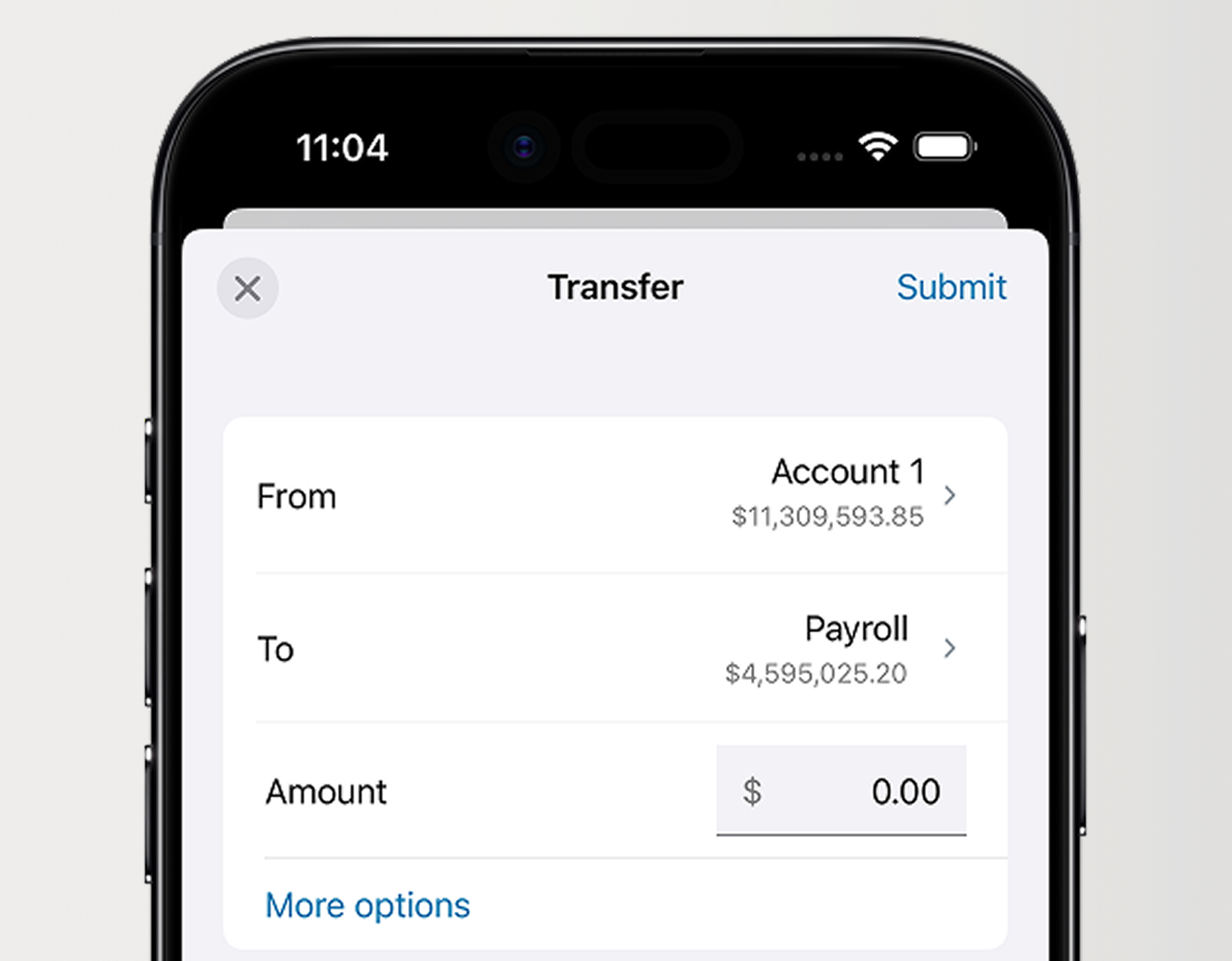
When moving money, accountholders will notice UX enhancements to all related forms – whether making an internal or external transfer, sending a wire, or anything else related to money movement. Mobile 3.32 and 3.33 will unify the look and feel of form inputs, such as text fields (as seen in Figure 5, above) and date selection, as well as introduce improved animations used for presentation and dismissal of forms.
Note that we have already shipped version 3.32 of our iOS app, and version 3.33 is currently in the works.
Mobile 3.34
ShippedBanno Mobile 3.34 will start to introduce larger structural changes to content. Search will see an overhaul in this release, moving from the navigation bar to the primary content area. This change ensures that when we enable Liquid Glass, the search UI automatically moves to the bottom toolbar, as expected. This means we also have to address how we expose filtering, which was previously tied closely to search. Filters will move to the navigation bar prior to Liquid Glass, after which they will move to the bottom toolbar, right next to search.
This release will also introduce consistent layout styles for landing and detail screens alike. We will address inconsistencies with how we present these screens as well, so accountholders can start relying on a cohesive experience throughout the app.
Mobile 3.35
ShippedOur UX Evolution changes in Banno Mobile 3.35 focus primarily on establishing the Jack Henry Rapid Transfers experience as the baseline for future changes to landing and detail screens across the app.
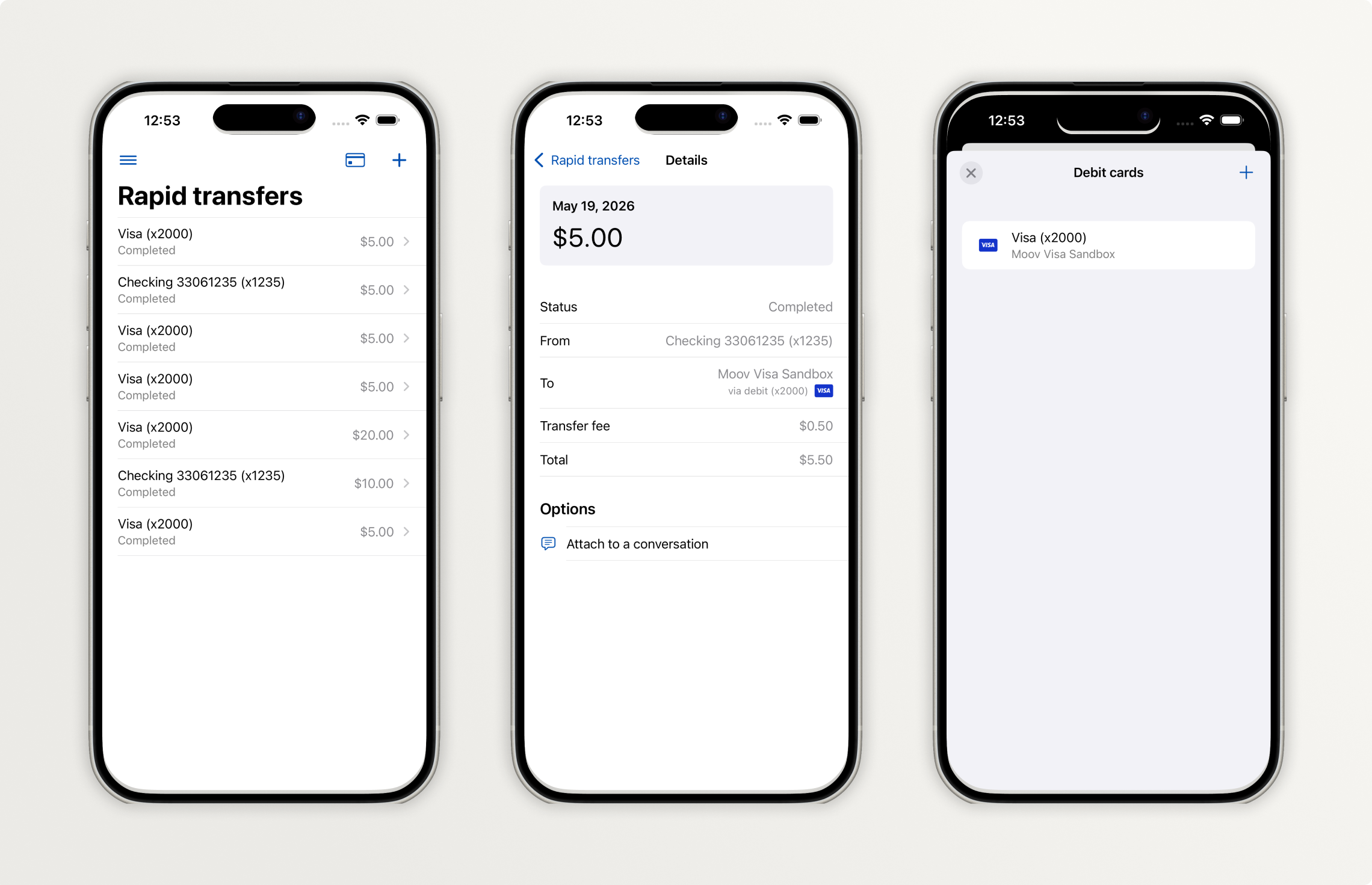
As seen in Figure 6, here’s what to expect with Rapid Transfers in Mobile 3.35:
- Landing screen
- The landing screen now uses a large navigation title and an edge-to-edge list.
- The data displayed in transfer rows has been consolidated to three elements: to account, status, and amount.
- The control to toggle between the activity list and debit cards has been removed. Cards are now accessed via the dedicated button in the upper right.
- The make transfer button now uses the standard system + button.
- Details screen
- The Details screen now uses an edge-to-edge list, with a large amount card at the top.
- Debit cards screen
- The Debit cards screen is presented modally, and it uses an inset list.
- Removing a debit card is now done via the standard system swipe-to-delete behavior.
- The add debit card button now uses the standard system + button.
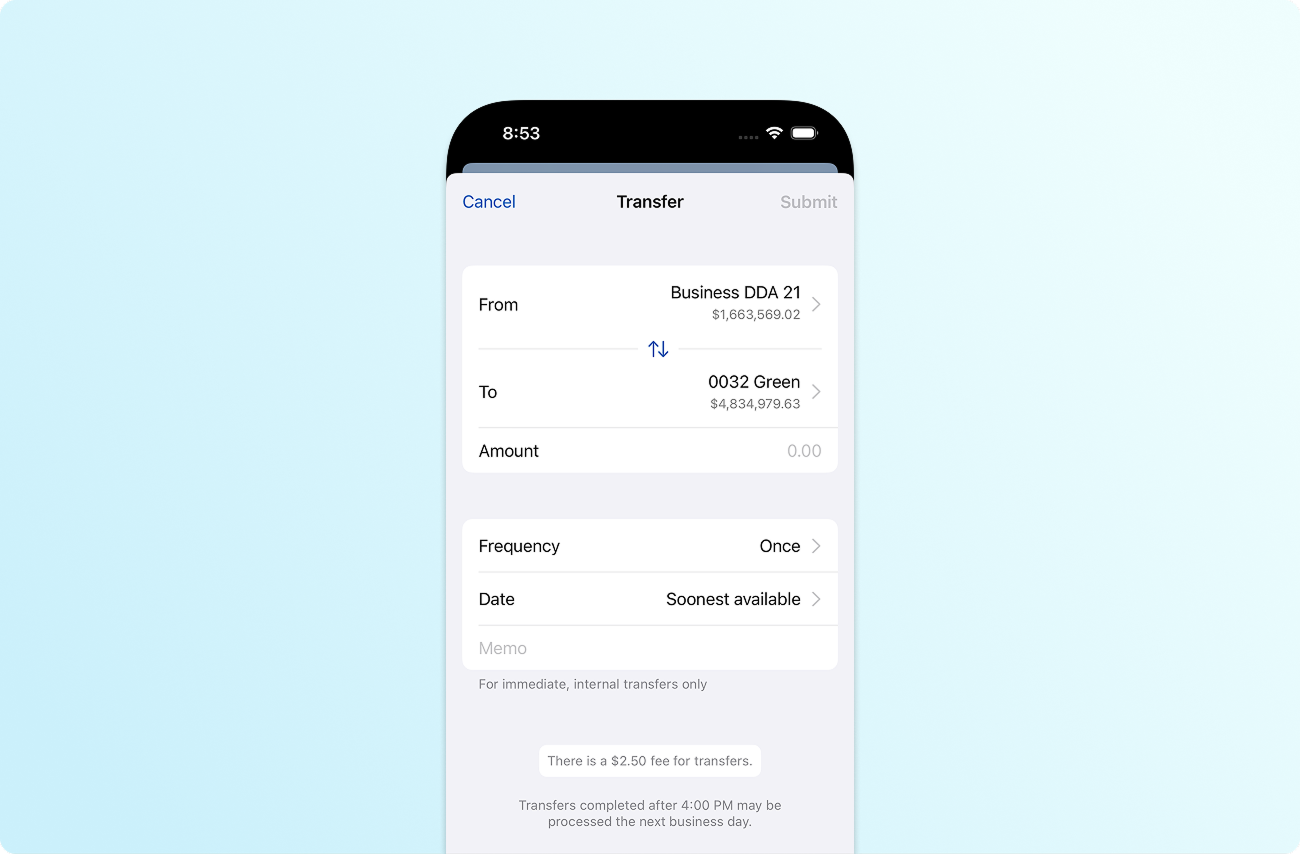
The UX for standard transfers is also changing with Banno Mobile 3.35, as seen in Figure 7 above. Here’s what to expect with standard transfers in Mobile 3.35:
- The form is now presented modally everywhere, and prevents users from exiting while a submission is in flight.
- The Amount input is presented as a standard currency field.
- The “more options” section now displays its contents (Frequency, Date, etc.) by default, rather than making the user tap to expand it.
- The Submit button has been moved to a prominent position in the toolbar, with a modern design that guards against repeated taps (that could cause duplicate submissions). The app now also clearly communicates when a transfer is still in a processing state.
Mobile 3.36
BuildingWith Banno Mobile 3.36, we’re continuing to refine forms for money movement throughout the app, we’re heavily focused on unifying presentation. From an accountholder perspective, these presentation updates surface visually as animation changes. Under the hood, the updates will empower us to extend the app in ways we couldn’t before. For example, we can support a more robust deep linking experience that (at some point) we could surface as consumer-facing AI assist functionality or as an integration with the new Siri AI experiences that Apple announced on June 8, 2026 .
We also have additional work to do migrating primary and secondary text colors from our previous custom themes to the colors that Apple’s system provides. These changes are unlikely to be highly noticeable, since our text colors have never deviated drastically from the system’s inherent colors.
Here are the specific screens we expect to update in Mobile 3.36:
- Scheduled transfers screen will inherit the same landing/details style changes we shipped for Rapid Transfers in Mobile 3.35
- ACH Batch Details screen will use our new standard details screen format
- ISO Create Wire screen text theming
- ISO Wires Add Creditor form presentation and style
- Bill pay form presentation for both the Add Payment and Add Payee flows
As our engineers complete this work, we will supplement the information above with screenshots and descriptions of the new experience.
Mobile 3.37
RadarIn Banno Mobile 3.37, we plan to finish building a system that lets us expand the overall color palette by leveraging your financial institution’s brand colors and the system palette. We are following Apple’s recommended guidelines for color usage while also looking to expand the system colors in athoughtful way that harmonizes with your overall brand. Once built, this system will open the door for us to further expand color usage over time. Today, the Transaction Enrichment features and Settings section of the app provide a glimpse into how we’ve already begun leveraging this color system (in its less robust state).
Here are the specific screens we expect to update in Mobile 3.37:
- Menu
- Account landing and details screens
- Transaction details
- Bill pay landing, Payment details, and Payee details screens
- Self Service Forms landing
- Messages landing
As our engineers complete this work, we will supplement the information above with screenshots and descriptions of the new experience.
Mobile 3.38
RadarThis release will mark our last big push before we turn on Liquid Glass (in Mobile 3.39). The screens we’ll address in Mobile 3.38 will focus heavily on Banno Business functionality.
Here are the specific screens we expect to update in 3.38:
- ACH landing
- ISO Wires landing and details screens
- Positive pay landing and details screens
- Manage business landing screen
- Manage users landing and details screens
- Remote Deposit Capture landing and details screens
As our engineers complete this work, we will supplement the information above with screenshots and descriptions of the new experience.